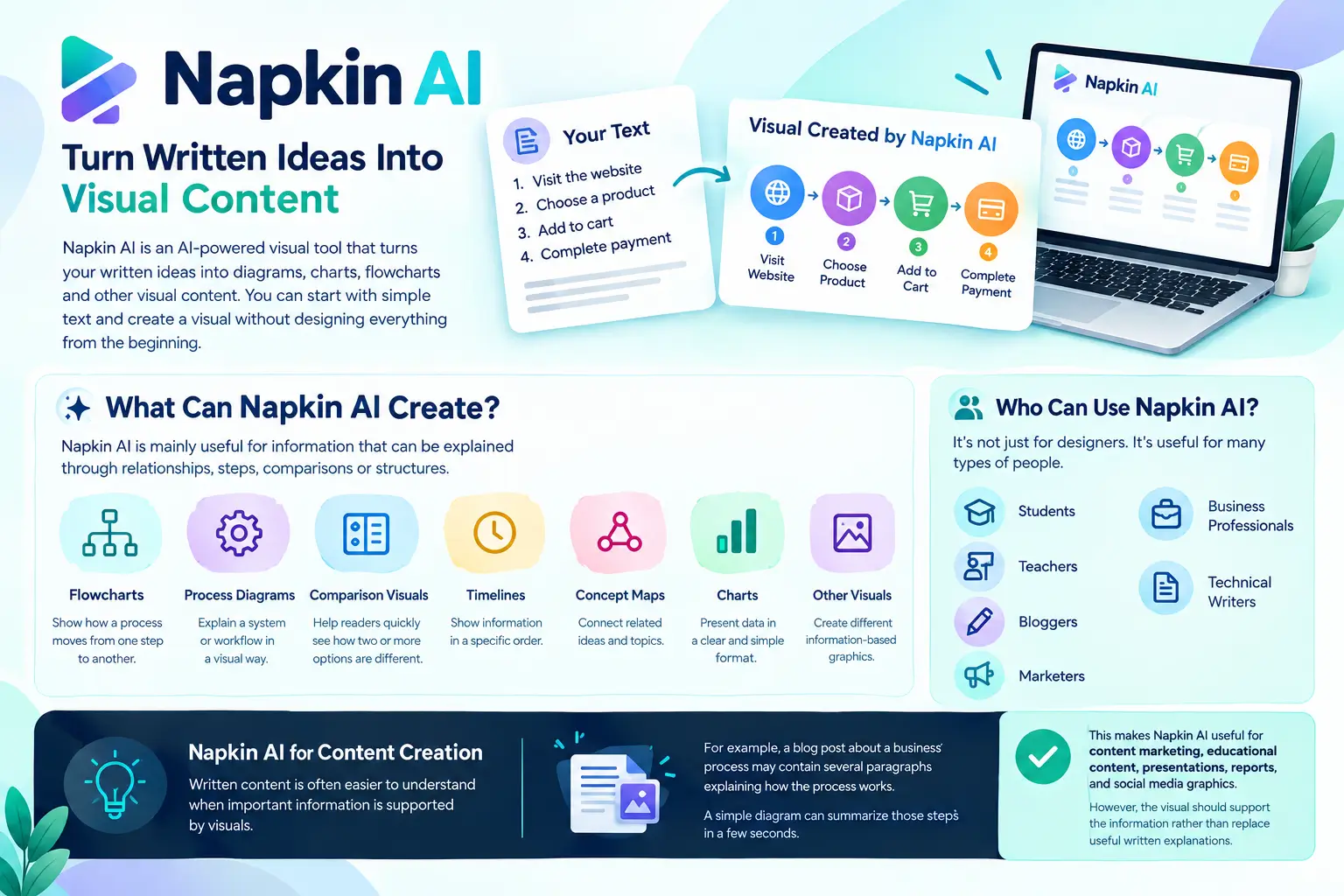
Napkin AI is an AI-powered visual tool that turns written ideas into diagrams, charts, flowcharts, and other visual content. You can start with simple text and create a visual without designing everything from the beginning.
For example, you can give Napkin AI a list of business steps and use it to create a process diagram. This makes information easier to read, understand, and share.
If you are exploring AI tools for content creation, This Platform can help turn blog ideas, reports, notes, and presentations into simple visuals. Artificial Flux also shares practical insights on AI tools, web design, and digital solutions to help you improve your online content.You can learn more about the tool on the official Napkin AI website.
What Is Napkin AI?
Napkin AI is a visual communication tool that uses artificial intelligence to convert text into visual explanations.
Instead of opening a blank design canvas, you begin with information. You can add a paragraph, notes, ideas, or a structured list. Napkin AI then analyzes the content and suggests a visual format.
These visuals can include:
- Flowcharts
- Process diagrams
- Timelines
- Comparison visuals
- Concept maps
- Charts
- Other information-based graphics
The main purpose of Napkin AI is to make written information easier to understand through visuals.
How Does Napkin AI Work?
This Platform looks at the meaning and structure of your text. It then tries to find a visual format that matches the information.
For example, imagine you write:
“First, a customer visits the website. Next, they choose a product. Then, they add it to the cart and complete the payment.”
Instead of leaving these steps as a paragraph, Napkin AI can turn them into a simple process that shows each stage.This approach is helpful because the user does not need to manually create every box, arrow, or section.
How to Use Napkin AI
Getting started with This AI Tool is simple, even if you have little design experience.
- Open Napkin AI and create or start a project.
- Add your written content to the workspace.
- Select the information you want to turn into a visual.
- Generate visual ideas from the selected content.
- Choose the visual that fits your topic.
- Make changes to the text, icons, layout, or style if needed.
- Export the finished visual for your project.
The exact interface and available options can change as the platform develops, so users should check Napkin AI for the latest features.
What Can Napkin AI Create?
This AI Tool is mainly useful for information that can be explained through relationships, steps, comparisons, or structures.
Flowcharts
Flowcharts can show how a process moves from one step to another.They can be useful for business workflows, customer journeys, project processes, and simple technical explanations.
Process Diagrams
A process diagram can explain a system or workflow in a visual way.For example, a company could use one to explain how a new employee moves through an onboarding process.
Comparison Visuals
Comparisons help readers quickly see how two or more options are different.You can use them for product comparisons, business strategies, features, services, or concepts.
Timelines
Timelines are useful when information follows a specific order.
They can help explain project stages, historical events, product development, or other time-based information.
Concept Maps
A concept map connects related ideas.
This can be useful for education, brainstorming, research, and explaining topics with several connected parts.
Who Can Use Napkin AI?
The AI visual tool is not limited to professional designers. Its text-based approach can make it useful for many types of users.
Students
Students can turn notes into visual summaries to make revision easier.
Teachers
Teachers can create visual explanations for lessons, presentations, and classroom materials.
Bloggers
Bloggers can turn important points from an article into visuals that support the written content.
Marketers
Marketing teams can create simple visual explanations for campaigns, customer journeys, and business presentations.
Business Professionals
Managers and consultants can use diagrams to explain plans, workflows, and processes.
Technical Writers
Technical writers can use visual content to make complex documentation easier for readers.
NapkinAI for Content Creation
Written content is often easier to understand when important information is supported by visuals.
For example, a blog post about a business process may contain several paragraphs explaining how the process works. A simple diagram can summarize those steps in a few seconds.
This makes AI useful for content marketing, educational content, presentations, reports, and social media graphics.However, the visual should support the information rather than replace useful written explanations.
NapkinAI for Presentations
Presentations often contain too much text.A slide with several long paragraphs can be difficult to read. A visual diagram can present the same idea in a simpler format.
NapkinAI can help users turn written presentation notes into visual content that can then be reviewed and edited before adding it to a presentation.This can save time when creating process diagrams or information-heavy slides.
AI Napkin for Business
Businesses can use visual communication to explain information to employees, customers, and stakeholders.
For example, a company could create visuals for:
- Business workflows
- Customer journeys
- Training materials
- Project processes
- Product explanations
- Internal documentation
- Strategy presentations
Visual content can make complex business information easier to scan and discuss.
A Simple Example of Using Napkin AI
Imagine a small online business wants to explain its order process.
The owner writes:
“Customer places an order, the team checks the payment, the product is prepared, the package is shipped, and the customer receives the order.”
This AI Tool can turn these written steps into a visual process.The owner can then review the result, make any necessary changes, and use the visual in a presentation, website, or internal document.
This example shows where the tool can save time: the user already understands the process, but This AI Tool helps present that information visually.
Napkin AI Features
Napkin AI focuses on creating visuals from written information rather than offering every feature found in a traditional design application.
Important capabilities include:
Text-to-Visual Creation
The core feature is converting written information into visual formats.
AI-Generated Visual Ideas
The tool can suggest different ways to represent the same information.
Visual Editing
Users can make changes to generated visuals instead of accepting the first result exactly as it appears.
Icons and Visual Elements
Visual elements can help make diagrams easier to understand and more attractive.
Export Options
Generated visuals can be exported for use in other documents, presentations, and content workflows. The competitor review specifically reports PNG and SVG export options.
Is Napkin AI Easy for Beginners?
Yes. One of the main ideas behind Napkin AI is to reduce the amount of manual design work needed to create information-based visuals.A beginner does not need to know how to build a flowchart from scratch.
Instead, the user can focus on writing clear information and then review the visual created from that information.Still, AI-generated visuals should be checked before publishing. If the original text is unclear, the resulting visual may also communicate the wrong idea.
Napkin AI Pricing
Napkin AI has offered a free option as well as paid plans. The competitor source reports that its March 2026 pricing included a Free plan, a Pro plan listed at approximately $8–$10 per month with annual billing, and custom pricing for Teams and Enterprise.
Pricing, limits, and features can change over time. Therefore, anyone planning to subscribe should check the current pricing directly on Napkin AI before making a purchase.For occasional users, starting with the free option can be a practical way to understand whether the tool fits their workflow.
Benefits of Napkin AI
Napkin AI can be useful when you need a visual but do not want to spend a lot of time creating one manually.
Saves Design Time
The AI handles much of the initial visual creation, so users can focus more on the information.
Easy Starting Point
You do not have to begin with an empty canvas.
Useful for Different Content
The same approach can work with business notes, educational material, articles, reports, and presentations.
Makes Information More Visual
Diagrams and visual summaries can help readers understand relationships and processes more quickly.
Helpful for Non-Designers
People without professional design skills can use the tool to create simple information-based visuals.
Limitations of Napkin AI
Napkin AI is useful for a specific type of visual work, but it may not be suitable for every design project.
Limited Creative Control
Professional designers may want more control over exact positions, layouts, typography, and individual elements.
AI Results Need Checking
The generated visual may not always represent the original idea perfectly.
Not a Full Design Platform
The AI Visual Toofocuses on information visualization. It is not intended to provide the complete range of tools found in advanced graphic design software.
Not Ideal for Every Data Project
If you need advanced visualizations based on live databases, spreadsheets, or complex datasets, a dedicated data visualization tool may be a better choice. The competitor article also identifies the lack of live data integration as a limitation.
Napkin AI vs Canva
Canva is a broader design platform with templates and tools for many types of creative content.
The Tool has a narrower purpose: turning written information into visual explanations.Choose The Ai tool when your main goal is to quickly visualize text. Choose Canva when you need more general graphic design and creative control.
Napkin AI vs Miro
Miro focuses strongly on online whiteboards, brainstorming, diagrams, and team collaboration.
Napkin AI is more focused on starting with written content and converting it into visuals.Therefore, the better option depends on whether your priority is text-to-visual creation or collaborative visual work.
Napkin AI vs Microsoft Tools
Microsoft offers several tools that can support diagrams, presentations, and visual content.
These tools may be convenient for people already working within Microsoft 365. Napkin AI can be more attractive when the main task is quickly converting written ideas into visual explanations.
When Should You Use Napkin AI?
Napkin AI can be a good choice when:
- You already have written content.
- You need a diagram quickly.
- You do not have advanced design skills.
- You want to explain a process visually.
- You create presentations or reports.
- You need visual support for educational or marketing content.
It may not be the best choice when you need highly customized artwork, advanced data visualization, or complete design control.
Is Napkin AI Worth Using?
Napkin AI can be valuable for users who frequently need to explain information through diagrams and visual content.Its biggest advantage is the simple starting point. Instead of designing from an empty page, you provide information and build from the generated result.
However, the tool works best when the content is clear and the user is willing to review the output.For quick business diagrams, educational visuals, documentation, and content marketing, Napkin AI is worth testing.
Frequently Asked Questions
What is Napkin AI?
Napkin AI is an AI-powered tool that converts written information into visual content such as diagrams, charts, and process visuals.
What is Napkin AI used for?
It is used to create visual explanations from text for presentations, reports, education, marketing, documentation, and business workflows.
Is Napkin AI free?
Napkin AI has offered a free plan, while paid plans provide additional usage and features.
Can Napkin AI turn text into a diagram?
Yes, its main purpose is to transform written information into different types of visual diagrams.
Is Napkin AI good for students?
Yes, students can use it to turn notes and complex ideas into simple visual explanations.
Can I use Napkin AI for blog posts?
Yes, you can create supporting visuals from important information in a blog post.
Does Napkin AI replace Canva?
No, Napkin AI focuses on text-based visual communication, while Canva covers a much wider range of graphic design needs.
Can beginners use Napkin AI?
Yes, beginners can use it because the workflow starts with written content instead of requiring advanced design skills.
Does Napkin AI create infographics?
It can create information-based visual layouts, although the exact visual types and features may change as the platform develops.
Is NapkinAI useful for business?
Yes, businesses can use it to explain workflows, processes, reports, presentations, training information, and customer journeys.
Final Thoughts
Napkin AI focuses on one useful idea: turning written information into visuals with less manual design work.It can help students, marketers, businesses, bloggers, teachers, and technical writers present information in a clearer way.
The tool is not a replacement for every design platform. Instead, it works best when you have useful information and need a simple visual way to explain it.If your work involves turning text into diagrams, process visuals, or presentations, NapkinAI is worth exploring.
[…] around AI and digital technology. You can also read our beginner-friendly articles on What Is Napkin AI? and What Is Claude AI? to explore other popular AI […]