Cursor 3 is more than a normal IDE update. It moves Cursor toward an agent-first coding workflow, where multiple AI agents can work on different tasks while you focus on the bigger picture. The xAI compute deal is also important, but it does not mean Grok is replacing Cursor’s coding models.
If you are new to AI coding tools, it helps to understand how they fit into the wider ecosystem. For example, our article on what is Claude AI explains why AI assistants have become useful for software development, while our DeepSeek V4-Pro coverage looks at another major model competing in the AI space.
Cursor is now pushing further toward autonomous software development. Instead of asking an AI assistant to change one file at a time, developers can give agents larger tasks and let them work across a project.
What Is Cursor 3?
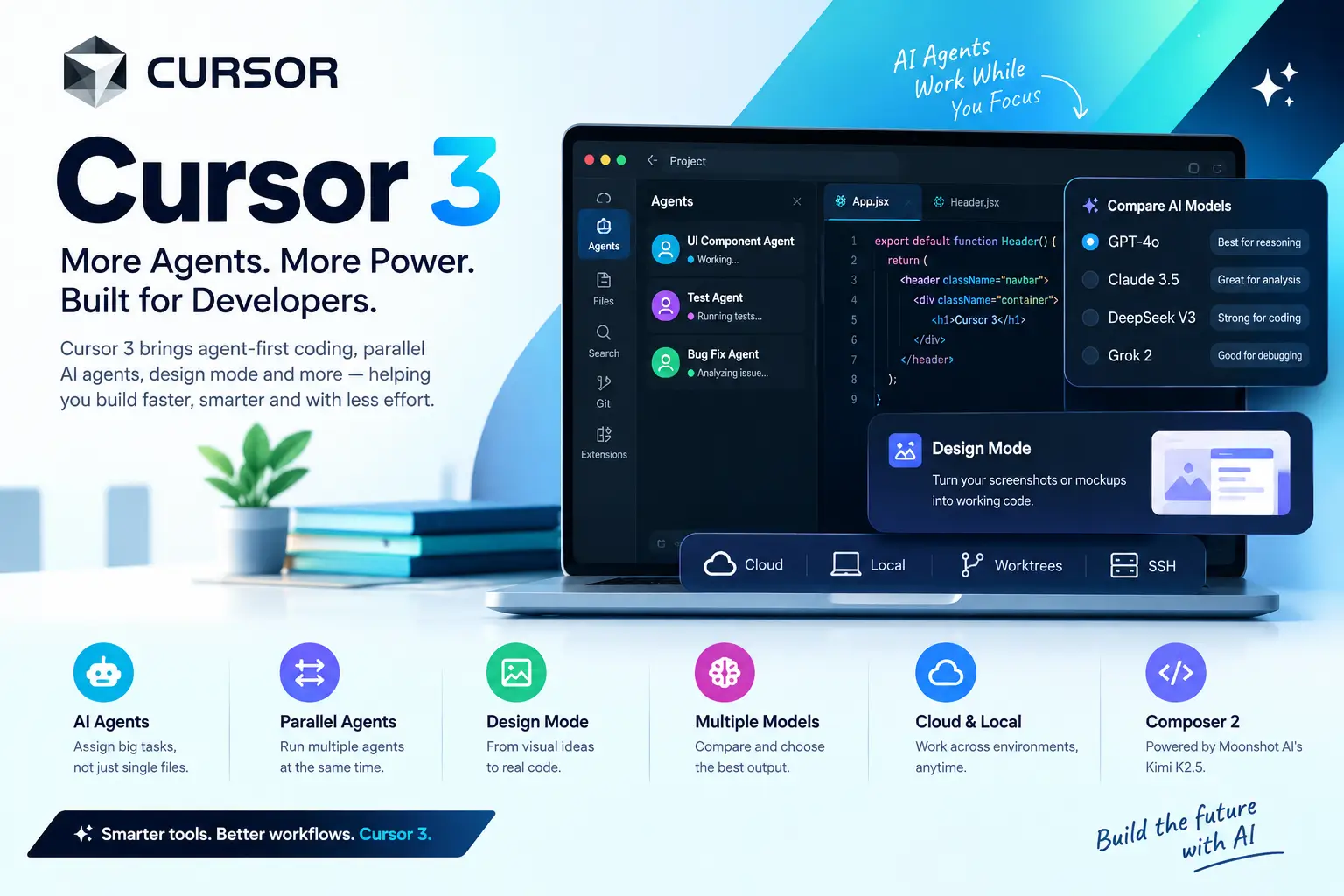
Cursor 3 is the latest major version of Cursor, an AI-powered code editor designed around modern software development workflows.The biggest change is not simply a better autocomplete feature. Cursor is putting AI agents closer to the center of the development experience.
Developers can create tasks for agents, let them inspect a codebase, make changes, run work in different environments, and return results for review.This makes Cursor feel less like a traditional editor with an AI assistant and more like a workspace for managing AI-powered development tasks.
Why Cursor 3 Is Different
Earlier versions of Cursor could already generate code, explain files, fix bugs, and help with refactoring.Cursor 3 takes that idea further by making agent-based work a major part of the interface.
Instead of constantly switching between prompts and files, developers can assign larger jobs to agents and monitor their progress.This is especially useful for projects containing many files, where a small change can affect components, tests, configuration files, and documentation at the same time.
The Agents Window
The Agents Window is one of the most important additions in Cursor 3.
It provides a central place to start and manage AI coding tasks. Rather than treating every prompt as a small conversation, you can think of each agent as a worker handling a particular development job.
For example, one agent could work on a UI component while another investigates a bug or prepares tests.
This approach can reduce the amount of repetitive work a developer has to perform manually.
Parallel AI Agents
One of the most useful ideas is running multiple agents at the same time.
A developer might ask one agent to refactor a component, another to generate tests, and another to investigate a reported issue.
The benefit is not simply speed. It also changes how developers organize their work.Instead of completing every task sequentially, independent tasks can move forward simultaneously.
However, developers still need to review the results. Running several agents does not remove the need for testing, code review, or human decision-making.
Cursor 3 Design Mode
Frontend developers have another reason to pay attention to Cursor 3: Design Mode.
The feature is aimed at turning visual references into working interfaces.You can provide a screenshot, mockup, or similar visual reference and ask Cursor to create the corresponding frontend code.
This can be useful when working with landing pages, dashboards, forms, product pages, and responsive layouts.
It does not mean every screenshot will instantly become perfect production code. Developers still need to check spacing, responsiveness, accessibility, component structure, and browser behavior.But it can significantly reduce the distance between a visual idea and a working prototype.
Comparing Multiple AI Models
Another useful capability is the ability to compare outputs from different models.This matters because no single AI model is perfect for every programming task.
One model may perform better at debugging, another at reasoning through a large codebase, and another at producing frontend code.Instead of relying on one model for everything, developers can test different options against the same task and judge which result is most useful.
This is becoming increasingly important as AI coding tools give users access to more models.
Cloud and Local Agent Workflows
Cursor 3 also focuses on moving work between different development environments.
Agents can work across local environments, cloud environments, worktrees, and remote SSH setups.That can be useful for developers who do not want every long-running task to occupy their local machine.
For example, you could start a larger coding task remotely and later inspect or continue the work from your main development environment.This makes AI coding more suitable for projects where tasks take longer than a typical chat interaction.
Composer 2: Cursor’s Coding Model
Cursor’s own Composer models are another important part of the product.
Composer 2 is designed for software development tasks and is based on technology from Moonshot AI’s Kimi K2.5, with additional training and reinforcement work by Cursor.The important point for developers is not simply the model’s name.
The real question is how well it handles practical programming tasks such as multi-file changes, refactoring, debugging, and keeping track of relationships across a large project.That is where coding models can provide much more value than basic autocomplete.
What Is the xAI Compute Deal?
The xAI deal is separate from Cursor 3’s user-facing features.Cursor reportedly reached an agreement with xAI to access GPU computing capacity for training its next-generation coding model, Composer 2.5.
xAI has invested heavily in large-scale AI infrastructure, including significant NVIDIA GPU capacity.For Cursor, access to additional computing resources can help support future model training and experimentation.
For xAI, renting computing capacity provides another way to monetize its expensive AI infrastructure.
Is Grok Replacing Cursor’s Models?
No.
This is one of the easiest parts of the story to misunderstand.
The xAI relationship is about compute infrastructure, not replacing Cursor’s coding models with Grok.Cursor’s current model strategy remains its own, while xAI is providing access to computing resources that can be used for future training.
So developers should not expect Cursor 3 to suddenly become a Grok-powered coding editor simply because of this deal.
Why the xAI Partnership Matters
Training advanced coding models requires a huge amount of computing power.Having access to large GPU clusters gives Cursor more flexibility when developing and training future models.
It could also reduce some of the dependency on traditional cloud infrastructure providers.The bigger story is therefore what happens next.
If Composer 2.5 delivers substantial improvements in coding accuracy, reasoning, long-context work, and autonomous development, Cursor users could eventually see the benefits directly in their workflows.
Cursor’s Position Against Other AI Coding Tools
Cursor is operating in an increasingly competitive market.
GitHub Copilot
GitHub Copilot remains one of the strongest choices for developers and organizations already working heavily inside the GitHub ecosystem.Its enterprise adoption and integration with development workflows give it a major advantage.
Cursor’s approach is different. It is building the editor itself around AI-assisted and agent-based development.
Windsurf
Windsurf has attracted developers looking for an AI-first coding environment with agent capabilities.It competes directly with Cursor on the idea that AI should participate in larger development tasks rather than only suggesting individual lines of code.
Claude Code
Claude Code takes a different approach by focusing heavily on terminal-based agentic coding.Developers who prefer command-line workflows can use it to work with repositories, execute tasks, and make changes through an AI coding agent.
Cursor is more visual and editor-centered, while Claude Code is particularly attractive to developers who are comfortable working from the terminal.
DeepSeek and Other Coding Models
Models such as DeepSeek are also increasing competition in AI-assisted programming.The result is good news for developers: AI coding is no longer controlled by one model or one company.
Developers can increasingly choose tools based on coding quality, price, context handling, integrations, privacy, and workflow.
Cursor 3 Pricing
Cursor’s pricing remains another important consideration for individual developers and teams.The Pro plan is positioned for individual users who want more advanced AI coding capabilities, while Business is designed for teams and organizations.
Pricing and usage limits can change, so developers should check Cursor’s current pricing before subscribing.
The bigger question is whether the productivity gained from agent-based development justifies the monthly cost.For someone who regularly works with large projects, the answer may be very different from someone who only writes occasional scripts.
Should You Upgrade to Cursor 3?
For existing Cursor users, there is little reason to treat Cursor 3 as a completely separate product purchase.
The more important step is learning how to use its agent workflow effectively.If you only use Cursor for autocomplete and quick edits, you may miss many of the capabilities that make the newer version different.
Try using agents for larger tasks instead of asking them to change one line at a time.Start with a small project or non-critical branch so you can understand how the workflow behaves before trusting agents with important production code.
How to Use Cursor 3’s Agent Workflow
Getting started does not have to be complicated.
- Open your project in Cursor 3.
- Open the Agents Window.
- Describe a specific development task.
- Let the agent inspect the relevant project files.
- Review the proposed changes and generated code.
- Run your tests and check the application.
- Use another agent for an independent task when the jobs can safely run in parallel.
The most important step is the review stage.
AI agents can save time, but developers should still verify generated code, dependencies, security-sensitive changes, and application behavior.
A Realistic Developer Example
Imagine a developer maintaining an online store with dozens of frontend and backend files.
A customer reports that the checkout page is slow and occasionally fails on mobile.Instead of manually searching through the project, the developer could ask one Cursor agent to investigate the checkout flow and another to inspect the mobile UI.
A third task could focus on creating tests around the affected functionality.The developer can then compare the findings, review the changes, run tests, and decide which solution should actually reach production.
That is where agent-based development becomes more interesting than simple AI autocomplete.
What the xAI Deal Could Mean for Future Cursor Users
The immediate impact of the xAI deal is limited because it concerns Cursor’s backend model development.The long-term impact could be much more important.
More computing resources can support larger training runs and experimentation with future coding models.If Cursor successfully turns that infrastructure into a stronger Composer model, developers could eventually benefit from better reasoning, more reliable code generation, stronger project-level understanding, and improved autonomous coding.
But the compute deal itself does not guarantee those improvements.The model still has to be trained well, evaluated properly, and integrated into a useful developer experience.
Cursor 3 vs Traditional AI Coding
Traditional AI coding tools often work like this: the developer asks a question, receives code, and manually decides what to do next.Agentic coding changes that relationship.
The developer gives the system a larger objective, while the AI handles more of the intermediate work.
That can make development faster, but it also makes review more important.The future of AI-assisted programming is likely to involve a combination of human planning, AI execution, automated testing, and human approval.
Is Cursor 3 Worth It?
Cursor 3 makes the most sense for developers who regularly work on real software projects and want AI to handle more than autocomplete.Its agent-first interface, parallel task execution, visual development capabilities, and evolving coding models make it a serious AI development environment.
For occasional programmers, the extra capabilities may not justify changing their workflow.
For professional developers and teams, however, the ability to delegate larger coding tasks can provide meaningful productivity gains.
What Developers Should Watch Next
The most interesting part of the Cursor story may not be Cursor 3 itself.The bigger question is what Composer 2.5 delivers.
The xAI compute agreement gives Cursor additional infrastructure for model development, but the final test will be the quality of the resulting coding model.Developers should watch for improvements in software engineering benchmarks, multi-file reasoning, debugging, long-running agent tasks, and real-world developer feedback.
If those areas improve substantially, Cursor could strengthen its position against Copilot, Windsurf, Claude Code, and other AI programming tools.
Frequently Asked Questions
Is Cursor 3 a new AI model?
No. Cursor 3 is primarily a new version of the Cursor development environment. Its features include an agent-focused workflow and access to Cursor’s coding models.
Is Cursor using Grok?
The xAI agreement is about computing resources for model training. It does not mean Grok is replacing Cursor’s own coding models.
What is Composer 2?
Composer 2 is Cursor’s coding model designed to handle software development tasks such as code generation, refactoring, and working across multiple files.
What is Composer 2.5?
Composer 2.5 is the next-generation model Cursor is developing. The reported xAI compute agreement is connected to training this future model.
Is Cursor better than GitHub Copilot?
There is no universal winner. Cursor is particularly focused on an AI-first editor and agent-based workflows, while GitHub Copilot has strong integration with GitHub and enterprise development environments.
Is Cursor better than Claude Code?
It depends on your workflow. Cursor is a full AI-focused code editor, while Claude Code is strongly centered around terminal-based agentic development.
Can Cursor 3 create a website from a screenshot?
Its Design Mode can use visual references to help generate frontend code. However, developers should still review responsiveness, accessibility, layout accuracy, and code quality.
Can multiple Cursor agents work at the same time?
Yes. Parallel agent workflows allow developers to handle separate tasks simultaneously, which can be useful for larger projects.
Is Cursor 3 worth paying for?
It can be worthwhile if you regularly develop software and use its agent features. Casual users may get enough value from simpler AI coding tools.
Final Thoughts
Cursor 3 represents a bigger change than another autocomplete improvement. Its main direction is clear: AI agents are becoming part of the development workflow itself.
The xAI compute agreement adds another interesting layer because it gives Cursor additional infrastructure for developing future coding models. But developers should judge the partnership by what eventually reaches their editor, not by the headline alone.
[…] interested in AI tools that improve productivity will find this development relevant, especially as Cursor 3, Perplexity and ChatGPT continue to shape the future of artificial […]