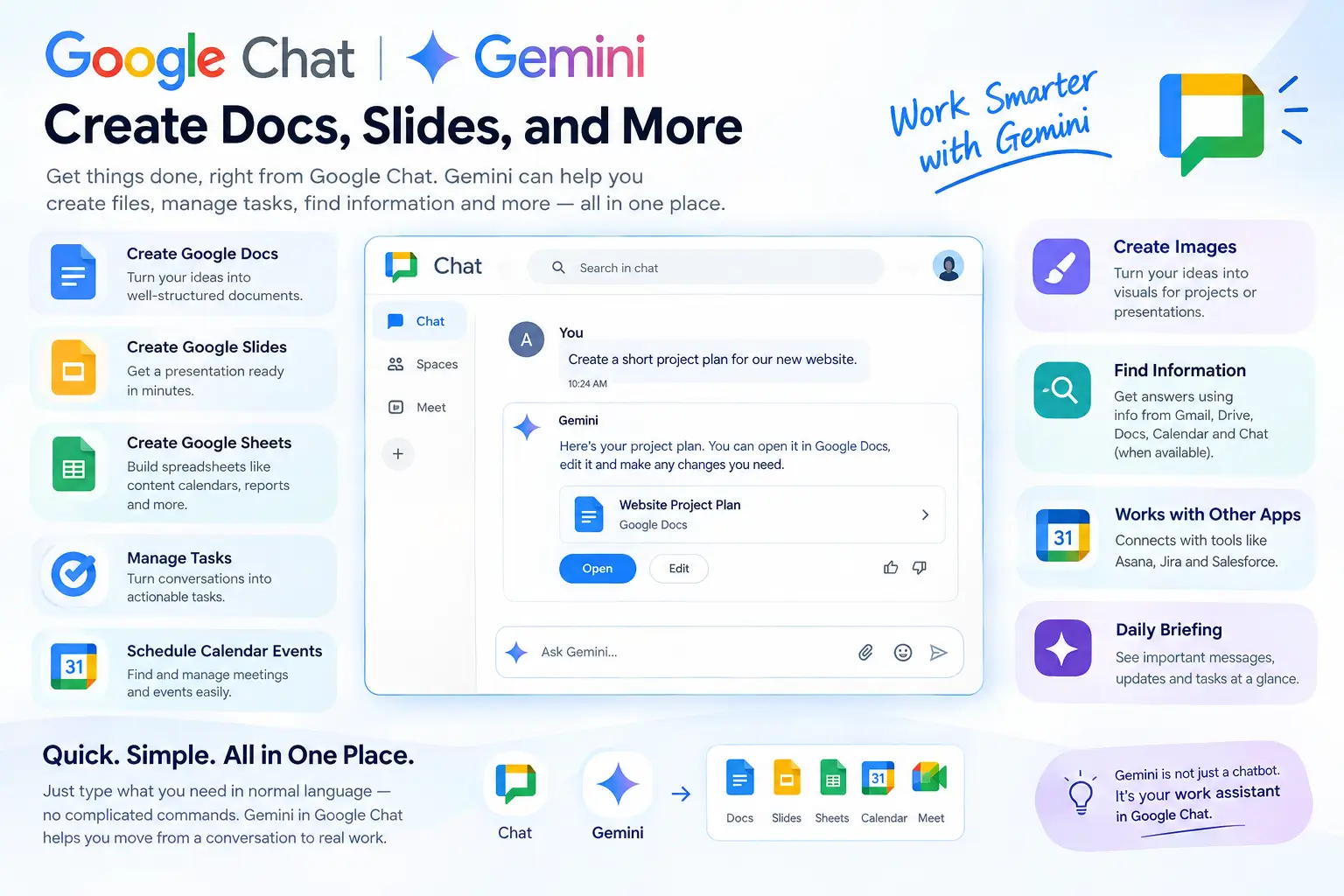
Want to create a document, presentation, task, or meeting without leaving Google Chat? Gemini in Google Chat can now help you do many of these tasks from one place. It can also use information from your Google Workspace when your account has access to these features.
Google’s AI tools are becoming more useful for everyday work, while other AI platforms such as DeepSeek V4-Pro are also adding advanced features for developers and businesses. If you’re interested in using AI for customer communication, you can also explore our guide on chatbots for customer service.
What Is Gemini in Google Chat?
Gemini is Google’s AI assistant. Gemini in Google Chat brings this assistant directly into Google Chat.
You can ask it questions in normal language. You can also ask it to help with work, find information, create files, and manage simple tasks.
For example, instead of copying a Chat conversation into Google Docs, you can ask Gemini to create a document from the information.This can save time for people who use Google Chat every day.
What Can Gemini Do in Google Chat?
Gemini can now do more than answer questions. It can help with several common work tasks.
Create Google Docs
You can ask Gemini to create a Google Docs file for you.
For example, you could type:
“Create a short project plan for our new website.”
Gemini can create the document based on your request. You can then open it in Google Docs, check the content, and make changes.
This is useful for project plans, meeting notes, reports, and other documents.
Create Google Slides
Need a presentation but do not want to start from a blank slide?
Gemini can help create a Google Slides presentation from a simple request.
You could ask:
“Create a presentation about our new product.”
It can create the main content and structure for the presentation. You should still check the slides and change anything that does not look right.
Create Google Sheets
Gemini can also help create spreadsheets.
For example, you can ask it to make a content calendar with columns for:
- Topic
- Keyword
- Writer
- Due date
- Status
This can give you a starting point instead of building the whole sheet yourself.
Create and Manage Tasks
Important tasks can easily get lost in a busy Chat conversation.
Gemini can help turn work into Google Tasks. You can use it to create, update, or complete tasks when the feature is available for your account.
For example, after a team discussion, you could ask Gemini to create a task for a team member.
Schedule Calendar Events
Gemini can also work with Google Calendar.
You can ask it to help find or manage meetings and events. This can be useful when a meeting has already been discussed in a Chat conversation.Instead of opening several apps, you can start the process from Chat.
Get a Daily Briefing
Busy teams can have many unread messages and tasks.
Gemini can help summarize important conversations and show things that may need your attention.This can be useful when you start work after being away for a few hours or a day.
Find Information
One of the useful parts of Google’s Workspace AI is its ability to work with information from different Workspace apps.
Depending on your account settings, Gemini may use information from Gmail, Drive, Docs, Calendar, and Chat.This means you may not need to search each app separately.
Create Images
Gemini can also create images from text requests.
For example, you could ask for an image idea for a presentation or a simple visual for a project.The available image features can depend on your Google account and Workspace plan.
How to Use Gemini in Google Chat
Using Gemini in Chat is simple when the feature is available on your account.
- Open Google Chat or Chat inside Gmail.
- Find Ask Gemini.
- Type what you want in simple words.
- Read Gemini’s response.
- Check the result and make changes if needed.
You do not need to write complicated commands. You can explain what you need in normal language.
For example:
“Create a short project plan for my website redesign.”
Gemini can then help you with the next step.
What Is Workspace Intelligence?
You may also see the term Workspace Intelligence when reading about these features.It is Google’s way of connecting Gemini with information across Workspace apps.
For example, information about one project may be in Gmail, Google Drive, Calendar, and Chat.
Workspace Intelligence helps Gemini work with this information when your account and admin settings allow it.This can make Gemini more useful because it has more context about your work.
Can Gemini Work With Other Apps?
Yes. Google is also adding connections with some third-party business tools.
Examples include Asana, Jira, and Salesforce.
This can help companies that use Google Workspace together with other work platforms.
For example, a team may talk about a project in Google Chat but manage development tasks in Jira. Connected tools can make it easier to work between these services.
Who Can Use Gemini in Google Chat?
Gemini in Chat can be useful for many types of users.
Remote Teams
Remote teams often have many Chat messages throughout the day.Gemini can help summarize information and highlight tasks that need attention.
Project Managers
Project managers can use Gemini to create project documents, tasks, meeting plans, and presentations.
Marketing Teams
Marketing teams can use it to create campaign plans, content ideas, reports, and presentations.
Small Businesses
Small businesses often have limited time and staff.Using Gemini for simple tasks can help reduce some manual work.
Web Designers
Web designers can also use Gemini for project briefs, meeting notes, task lists, and client presentation ideas.For example, Artificial Flux could use this type of workflow when planning a website project, creating a project brief, or organizing tasks for a client website.
A Simple Example
Imagine a small team is working on a new website.The team talks about the project in Google Chat. They discuss the design, deadline, pages, and tasks that need to be completed.
Instead of copying all this information into different apps, the project manager can ask Gemini to help create a project brief and organize the tasks.The team still needs to check the results, but Gemini can make the first step much easier.
Which Google Workspace Plans Support It?
Gemini features are not available in exactly the same way for every Google account.Google provides Gemini features for several Workspace plans, including some Business, Enterprise, Education, Frontline, and Nonprofit plans.
AI add-ons can also provide access to additional features.
Your company administrator can control which Gemini and Workspace Intelligence features are available.So, if you do not see Ask Gemini in Google Chat, your account plan or admin settings may be the reason.
What Gemini in Google Chat Cannot Do
Gemini can save time, but it is not perfect.
It Can Make Mistakes
AI can sometimes give wrong information or misunderstand your request.Always check important documents, numbers, dates, and other details before using them.
Your Admin Can Control It
Your company administrator can control what information Gemini can access.For example, access to Gmail, Drive, Calendar, or Chat information may be limited.
Some Features May Not Be Available
Different accounts can have different Gemini features.Your plan, location, language, and company settings can affect what you see.
You Still Need to Review the Work
Gemini can create a first draft, but you should not blindly use it.Read the document, check the facts, and make changes before sending important work to a client or team.
Gemini in Google Chat vs. Regular Gemini
Regular Gemini is useful for general questions, ideas, writing, and other AI tasks.
Gemini inside Google Chat is more focused on your work.
It can work with your Workspace information and help you move from a conversation to an actual task or file.
For example:
Regular Gemini:
“Give me ideas for a website project.”
Gemini in Chat:
“Create a project brief from our website discussion.”
The second request is more connected to your work.
Does Gemini Save Time?
It can, especially for small tasks.
Without Gemini, you may need to:
Read Chat → copy information → open Docs → create document → open Calendar → create meeting → create tasks
With Gemini, some of these steps can happen from the same place.
But the time you save depends on how good the result is. If you need to rewrite everything Gemini creates, the benefit will be smaller.That is why it is better to think of Gemini as a work assistant, not a replacement for people.
Is Gemini in Google Chat Safe for Business Work?
Google provides controls for Workspace administrators and organizations.Companies can decide which Workspace data sources are available to Gemini.
However, businesses should still follow their own privacy and security rules when using AI tools.Do not assume that every AI-generated result is correct or suitable for sharing.
Frequently Asked Questions
Can Gemini create a Google Doc in Chat?
Yes. Gemini can help create a Google Docs file from a natural-language request when the feature is available.
Can Gemini create Google Slides?
Yes. Gemini can create presentations based on your request and available Workspace information.
Can Gemini create Google Sheets?
Yes. Google now lists spreadsheet creation among the capabilities available through Ask Gemini in Chat.
Can Gemini schedule a meeting?
Gemini can help with Google Calendar events when the required feature and account permissions are available.
Why can’t I see Ask Gemini in Google Chat?
Your Google Workspace plan, administrator settings, language, or feature availability may be the reason.
Is Gemini in Google Chat free?
It is mainly available through eligible Google Workspace plans and AI access. It is not available in the same way to every Google Chat user.
Can Gemini use my Gmail and Google Drive?
It can use relevant Workspace information when the required services are enabled for your account and organization.
Can Gemini create tasks?
Yes. Gemini can help create and manage Google Tasks when the feature is available.
Can I use Gemini in Google Chat on mobile?
Google provides Ask Gemini on supported mobile experiences, but some features may differ between devices and accounts.
Final Thoughts
Gemini in Google Chat is becoming more than a simple AI chatbot. It can help create Docs, Slides, and Sheets, manage tasks, work with Calendar, summarize information, and support research.The main benefit is simple: you can do more work without constantly moving between different apps.
Still, Gemini should be treated as an assistant. Check its work, correct mistakes, and review important information before you share it.For teams that already use Google Workspace every day, these features can make common work tasks easier and more organized.
[…] ChatGPT explains how the AI assistant works and what you can use it for. You can also explore our Gemini article for a closer look at its search-focused […]