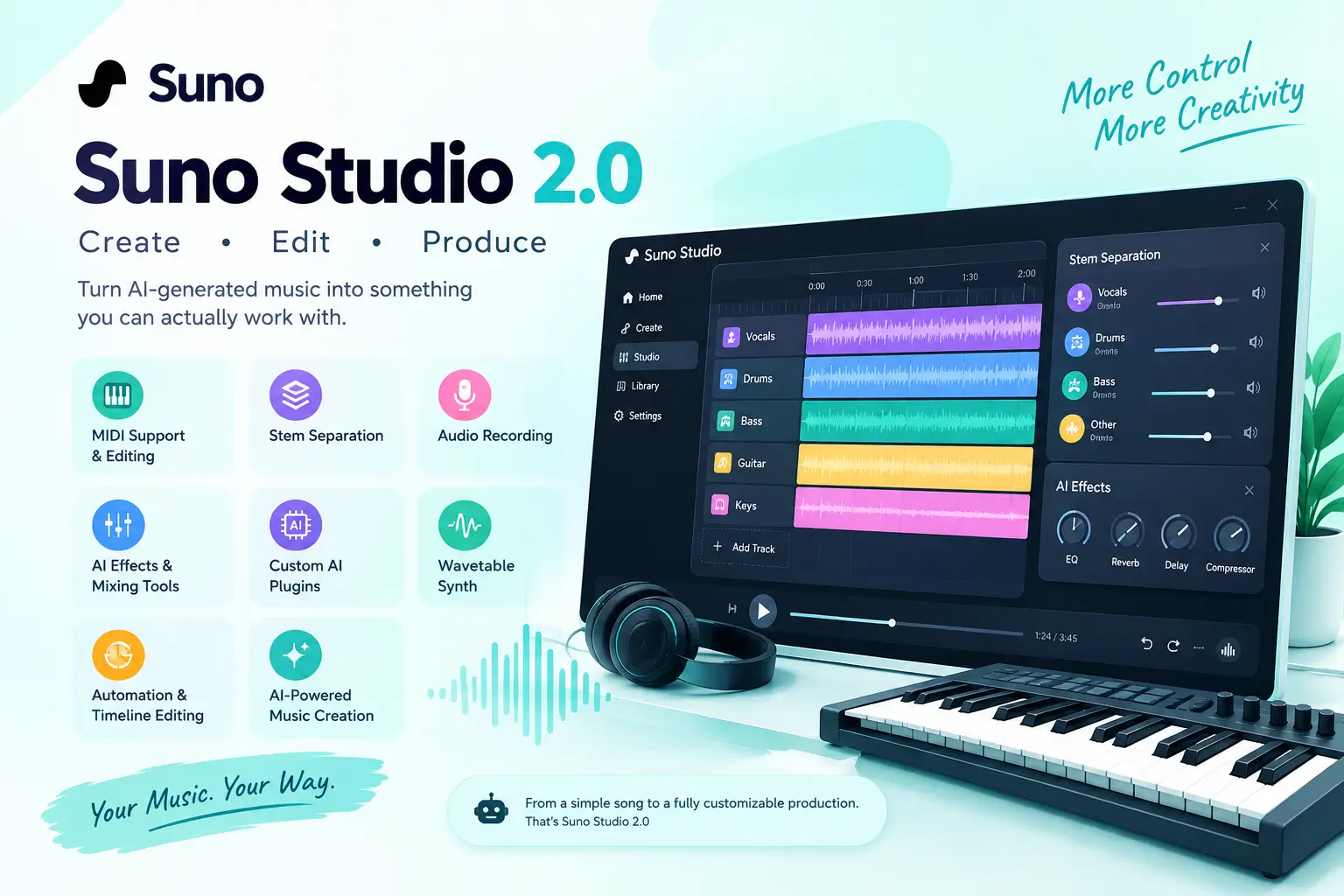
Suno Studio 2.0 turns AI-generated music into something you can actually work with. It adds MIDI, stem separation, audio recording, effects, automation, and other production tools, giving creators more control over what happens after a song is generated.
For readers new to AI music, what is Windsurf AI and what is Google I/O can also provide useful context about how generative AI tools are changing creative workflows.
What Is Suno Studio 2.0?
Suno Studio 2.0 is a music creation and editing workspace built into Suno. Instead of stopping after generating a complete song, users can work with the individual parts of a track and make changes to the arrangement and sound.
The major change is the move from simple AI music generation toward a more flexible production workflow.
A generated song can now become a starting point for further editing. Creators can work with audio, MIDI, stems, effects, recordings, and other production controls inside the Studio environment.
Who Is Suno Studio 2.0 For?
Suno Studio can be useful for different types of creators.
Songwriters can use AI to develop musical ideas, while producers can work with generated material and modify individual parts. Content creators can also use it to develop background music for videos, podcasts, social media, and other projects.
It can also appeal to beginners who want to experiment with music production without starting with a complicated traditional DAW.
What’s New in Suno Studio 2.0?
Suno Studio 2.0 introduced several features that address some of the limitations of earlier AI music workflows.
The important part is not just the number of features. It is how these tools work together to give creators more control over generated music.
MIDI Support and Editing
MIDI is one of the most important additions to Suno Studio.MIDI stores musical information such as notes, timing, pitch, and performance data rather than simply storing recorded sound. This means creators can work with musical ideas in a more editable format.
For example, a generated melody can be used as a starting point and adjusted instead of keeping the original audio exactly as it was.MIDI can also make it easier to experiment with different instruments, arrangements, and musical patterns.
AI Stem Separation
Stem separation allows a song to be divided into individual musical elements.Instead of working only with one finished audio file, creators can work with parts such as vocals, drums, bass, and other instruments.
This is useful when someone likes most of a generated track but wants to change one element. A creator may want to lower the vocals, replace a drum part, remix an instrumental section, or process different elements separately.Stem-based editing therefore makes AI-generated music more practical for post-production.
Audio Recording
Suno Studio also brings recording into the creative workflow.
Creators can record their own audio and combine human performances with AI-generated material. This opens up workflows involving vocals, instruments, musical ideas, and other recordings.
For example, someone could create an AI-generated backing track and then add their own vocal performance.This combination of human input and AI generation can make the final result more personal.
AI Effects and Mixing Tools
Music production is not only about generating sounds. Mixing and processing are also important.Studio provides effects and audio-processing tools that can be used to shape the sound of a project.
Depending on the workflow, creators can use tools such as EQ, compression, reverb, delay, distortion, and other effects to change how individual sounds behave.This gives users more control than simply downloading a generated song and editing it somewhere else.
Custom AI Plugins
Another interesting part of Suno Studio is its approach to AI-powered plugins.
Instead of relying only on traditional music-production plugins, users can describe the type of processing or sound they want and create a customized AI-based tool within the Studio environment.This could be useful for creators who want to experiment with unusual effects or develop a particular sound without manually building every processing chain.
However, these AI plugins should not be confused with traditional VST or Audio Unit plugins used by professional DAWs.
Wavetable Synth
Suno Studio also includes a wavetable synthesizer for creating and shaping electronic sounds.
A synthesizer can be used for sounds such as basses, leads, pads, and other musical elements.This gives producers another way to build sounds instead of depending entirely on AI-generated audio.
Automation and Timeline Editing
Automation is important when you want a sound to change over time.
For example, a producer might gradually increase volume, change an effect, adjust a filter, or create movement during a transition.Timeline-based editing also makes it easier to arrange different sections of a song and control how the track develops from beginning to end.
AI-Powered Music Creation
The bigger idea behind Studio 2.0 is combining AI generation with traditional editing concepts.
Instead of choosing between an AI music generator and a production environment, creators can use AI for ideas and then continue working on those ideas inside the same workspace.That can make the creative process more flexible, particularly for people who want more than a one-click finished song.
What Can You Do With Suno Studio 2.0?
Suno Studio 2.0 can support several different music-production workflows.
Edit AI-Generated Songs
An AI-generated track does not necessarily have to remain unchanged.
Creators can use editing tools to adjust sections, change sounds, work with individual elements, and shape the arrangement around their needs.This is particularly useful when the original generation has a good idea but needs additional work.
Separate Vocals and Instruments
Stem separation can be useful when you want to isolate parts of an existing track.
For example, a creator working on a video might want an instrumental version without the original vocals.A producer could also isolate a particular element for additional processing or experimentation.
Turn a Melody Into a Full Track
A simple melody can become the foundation for a larger musical idea.
With MIDI and AI generation working together, creators can start with musical information and explore different arrangements, sounds, and styles.This approach can be useful for songwriters who have an idea but need help developing it.
Record Vocals and Instruments
Creators do not have to rely entirely on AI-generated performances.
Recording allows users to bring their own voice or instruments into the project and combine those recordings with generated material.This creates a hybrid workflow where AI handles some parts while the human creator controls others.
Create and Customize Sounds
The combination of a wavetable synthesizer, effects, automation, and AI-powered plugins provides several ways to experiment with sound.
This can be especially useful for electronic music, background scores, experimental tracks, and short-form content.
How to Use Suno Studio 2.0
The basic workflow is relatively straightforward.
- Open Suno Studio and create or open a project.
- Add an existing song, audio recording, or MIDI material.
- Arrange clips and musical elements on the timeline.
- Generate, edit, or modify parts of the project.
- Separate stems when you need individual musical elements.
- Apply effects and automation to shape the sound.
- Review the finished project and export the material you need.
The exact tools available can depend on the current Suno plan and Studio version.
Suno Studio 2.0 vs Udio
Suno and Udio both focus on AI-generated music, but their workflows can appeal to different types of creators.Suno’s Studio approach puts more emphasis on continuing to work with generated music after the initial creation stage.
MIDI, stem separation, effects, recording, and timeline editing are particularly relevant to creators who want to take an AI-generated idea further.Udio has also been recognized for giving creators control over generated music, particularly around generation and musical detail.
Rather than choosing a platform based only on the number of features, creators should consider the workflow they actually need.Someone primarily interested in quickly generating songs may have different requirements from a producer who wants to edit individual musical elements.
Suno Studio 2.0 vs Traditional DAWs
Traditional DAWs such as Logic Pro, Ableton Live, FL Studio, and Pro Tools have been developed around detailed music-production workflows.They offer extensive editing, recording, mixing, MIDI, and plugin ecosystems.Suno Studio approaches music production from a different direction.
Its main advantage is the combination of AI generation and production tools in one environment. A creator can start with an AI-generated idea and continue developing it rather than moving immediately between multiple applications.
Suno Studio for AI Music Production
Suno Studio is particularly relevant to creators who want AI involved directly in the production process.The workflow can begin with an AI-generated idea and continue through editing, stem work, effects, MIDI, and other adjustments.
Traditional DAWs for Music Production
Traditional DAWs remain important for creators who depend on established recording workflows, extensive third-party plugins, detailed mixing tools, and professional production environments.
They also provide years of established workflows that experienced producers may already know well.
Can Suno Studio Replace a DAW?
For some AI-focused creative workflows, Studio can handle a significant amount of music production.However, it should not automatically be treated as a complete replacement for every professional DAW.
The better question is what type of production you need. Someone creating AI-assisted music may find Studio useful, while a producer dependent on a large collection of third-party plugins may still prefer a traditional DAW.
Real-World Example of Using Suno Studio 2.0
Imagine a YouTube creator needs background music for a technology video.
They generate a suitable track in Suno but decide that the vocals are distracting. Instead of abandoning the entire song, they can work with the available stems and focus on the instrumental elements.
They can then adjust the arrangement, apply effects, and combine the result with their video.This shows why editable AI music can be more useful than a finished audio file that cannot easily be changed.
Suno Studio 2.0 Limitations
Studio 2.0 adds many production features, but it also has limitations that creators should understand.
Subscription and Availability
Access to Studio features can depend on Suno’s current subscription plans and availability.Users should check Suno’s current plan information before assuming that every Studio feature is available on a free account.
Browser and Device Limitations
Suno Studio is designed around a browser-based workflow.Performance can depend on the browser, computer, project size, and other technical factors. Users working on larger projects should also consider their system resources.
VST and Audio Unit Plugin Support
Suno’s custom AI plugins are different from the conventional VST and Audio Unit plugins commonly used in traditional DAWs.Creators who depend heavily on third-party plugin libraries should therefore understand this difference before moving their entire workflow into Studio.
MIDI and Stem Limitations
AI-generated MIDI and automatically separated stems may still require manual checking.A generated musical part may not always match exactly what a producer would have created manually, while separated stems can contain artifacts or unwanted sounds.For serious production work, listening carefully and making corrections remains important.
Suno Studio 2.0 September 2026 Updates
Suno continued improving Studio after its initial 2.0 release.
The later updates focused on areas such as MIDI performance, audio generation, Studio performance, and workflow improvements.These changes are important because Studio 2.0 is not a static product. Suno is continuing to develop the production experience and refine how creators work with AI-generated music.
Improved MIDI Features
Later improvements to MIDI make the workflow more useful for creators who want to move between musical notes and generated audio.Better MIDI-related processing can help users develop musical ideas without depending entirely on full-song generation.
Better Audio Generation
Improvements to the relationship between MIDI and generated audio can give creators more ways to control the musical direction of a generation.This is especially useful when the creator already has a melody or musical structure in mind.
Studio Performance Improvements
Performance improvements can make a difference when working with larger projects.Faster loading, playback improvements, and smoother editing can reduce interruptions during the production process.
Editing and Plugin Improvements
Suno has also continued refining Studio’s editing and plugin-related functionality. With these improvements, creators can move more easily from generating a song to actively shaping and producing it with AI.
Suno Studio 2.0 Pricing and Availability
Suno Studio 2.0 availability and pricing can change as Suno updates its plans.Creators should check Suno’s current pricing page before subscribing because feature access, credits, and Studio capabilities may vary between plans.
This is especially important for users who need advanced stem separation, higher usage limits, or other production features.
Frequently Asked Questions About Suno Studio 2.0
What Is Suno Studio 2.0?
Suno Studio 2.0 is Suno’s AI-powered music creation and editing workspace. It combines AI music generation with tools such as MIDI, stem separation, recording, effects, automation, and sound creation.
Is Suno Studio 2.0 Free?
Studio availability depends on Suno’s current subscription plans. Users should check the latest Suno pricing and plan details before subscribing.
Does Suno Studio 2.0 Support MIDI?
Yes. MIDI is one of the major parts of the Studio workflow, allowing creators to work with musical notes and use MIDI-based ideas in their projects.
Can Suno Studio Separate Vocals and Instruments?
Yes. Suno Studio provides stem separation tools that can isolate vocals and different instrumental elements from music.
Can I Record Vocals in Suno Studio?
Yes. Studio supports audio recording, allowing creators to bring their own performances into a project.
Can I Create Custom Plugins in Suno Studio?
Yes. Suno Studio includes AI-powered custom plugin creation, allowing users to create specialized effects and processing tools.
Does Suno Studio Support VST Plugins?
Suno’s custom Studio plugins are not the same as conventional VST or Audio Unit plugins. Users who rely on traditional third-party plugin ecosystems should keep this limitation in mind.
Can Suno Studio Replace a DAW?
It can cover many parts of an AI-focused music workflow, but whether it can replace a traditional DAW depends on the creator’s production requirements.
Can I Use Suno Studio on Mobile?
Studio is primarily designed around a desktop browser workflow, so creators should check Suno’s current device and browser support before relying on it for mobile production.
What Can I Export From Suno Studio?
Export options can include finished audio and individual musical material depending on the project and available Studio features.
Final Thoughts on Suno Studio 2.0
Suno Studio 2.0 represents a broader approach to AI music creation. Instead of stopping when an AI-generated song is finished, creators can continue working with the music through MIDI, stems, recording, effects, automation, synthesis, and other production tools.
That makes Suno more relevant to people who want control over AI-generated music, not just quick song generation.
Add a Comment